Workaround for ThinkSmart Core Gen 2 Multi-Camera Connection Issues
Products affected: Lenovo ThinkSmart Core Gen 2
Conditions: Connecting multiple USB cameras to the USBA-2, USBA-3, and USBA-4 ports on the ThinkSmart Core Gen 2 may cause USB bandwidth contention, resulting in video capture instability issues, such as missing camera video or image flickering.
Operating Systems:
Windows 10 IoT
Windows 11 IoT
Workaround: Follow the recommended port configurations below to ensure stable video capture across all connected devices.
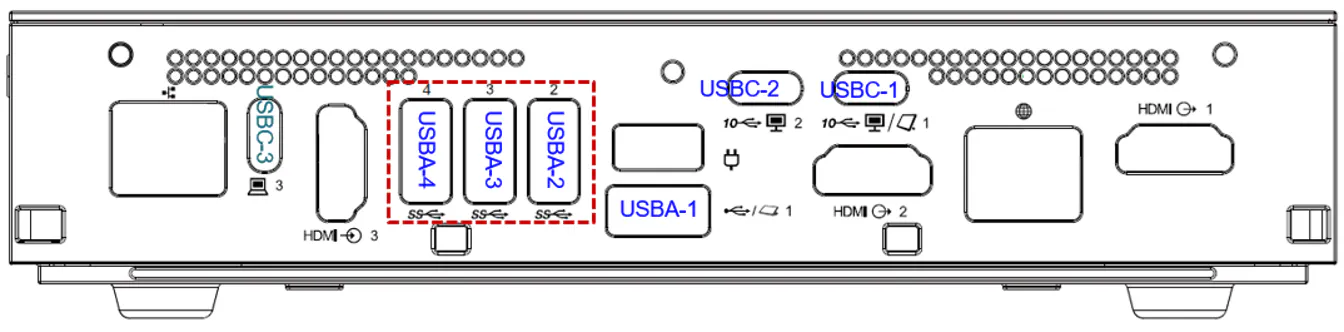
Non-BYOM Model Setup
Non-BYOM models support up to four cameras simultaneously using the following port combination:
One camera connected to any USBA-2, USBA-3, or USBA-4 port.
One camera connected to USBC-1.
One camera connected to USBC-2.
One camera connected to USBA-1.
Touch Controller connected to any remaining unused USBA-2, USBA-3, or USBA-4 port.
BYOM Model Setup
BYOM models support up to three cameras simultaneously using the following port combination:
One camera connected to any USBA-2, USBA-3, or USBA-4 port.
One camera connected to USBC-1.
One camera connected to USBC-2.
Touch Controller connected to USBA-1.
Note: In BYOM mode, the Touch Controller must be connected to USBA-1. Connecting the Touch Controller to the USBA-2, USBA-3, or USBA-4 ports is not supported.
Port Limitations and Guidelines
The USBA-2, USBA-3, and USBA-4 ports are limited to a combined total of one camera.
The USBA-1 port only supports USB 2.0 bandwidth. Connecting a USB 3.x camera to USBA-1 will cause performance downgrades, including reduced resolution and frame rate.
If you need additional assistance with your Logitech-bundled ThinkSmart Core Gen 2, please contact Logitech Business Support.