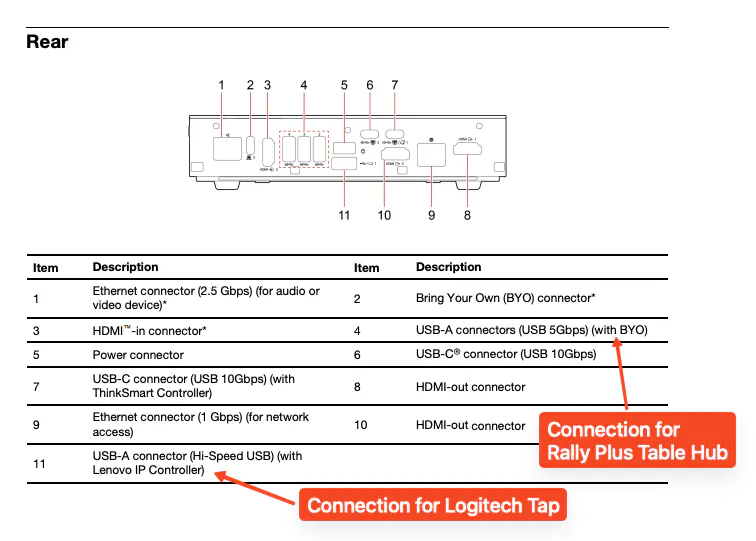
Wiring guidance for the Lenovo ThinkSmart Core Gen2 compute (12X2S00010) with Rally System + Tap Cat5e kit in “Computer at Table Hub” configuration
Products Affected: Rally System, Tap Cat5e Kit, Lenovo ThinkSmart Core Gen2 compute
Conditions: Depending on the USB-A ports used to connect Logitech components to a Lenovo ThinkSmart Core Gen2 compute (12X2S00010) with Rally System and Tap Cat5e kit installation in a “Computer at Table Hub” configuration (see Rally & Rally Plus Wiring Diagram), the Rally System camera and audio may stop functioning when a laptop is connected to the Tap Cat5e kit HDMI-IN port and screen sharing is active due to USB bus bandwidth limits.
Resolution: Follow the instructions in the Lenovo ThinkSmart Core Gen2 Hardware Maintenance Manual, page 1, “Rear” diagram: Connect the Tap Cat5e Kit to a horizontally-oriented USB-A port marked (11) in the picture, then connect the Rally System Table Hub to the vertically-oriented USB-A port marked (4) in the picture below.
Issue Number: 1617