
Controls and light indicator on Zone Wireless 2 ES
Below you will find a guide covering the controls and light indicator on Zone Wireless 2 ES:
Controls
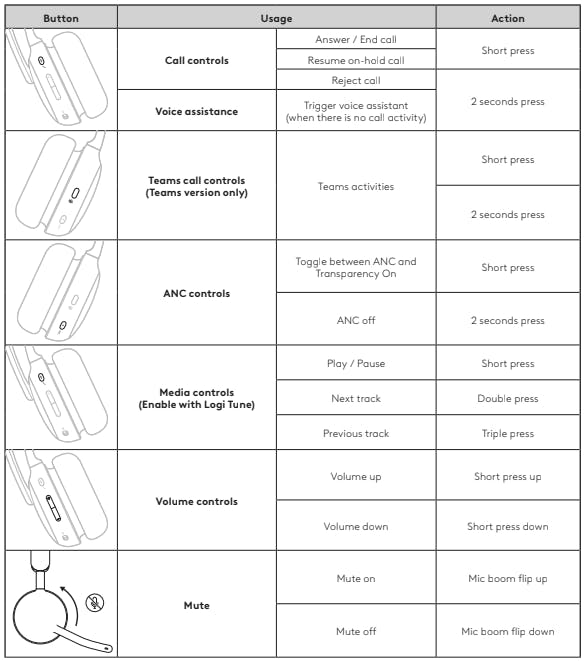
Call controls
Answer / End call / Resume on-hold call - Short press
Reject call / Trigger voice assistant* - 2 seconds press
*When there is no call activity
Teams call controls (Teams version only)
Teams activities - Short press / 2 second press
ANC controls
Toggle between ANC and Transparency On - Short press
ANC off - 2 seconds press
Media controls (Enable with Logi Tune)
Play / Pause - Short press
Next Track - Double press
Previous track - Triple press
Volume controls
Volume up - Short press "+"
Volume down - Short press "-"
Mute
Mute on - Mic book flip up
Mute off - Mic boom flip down
NOTES:
Teams activities are only functional when Teams is running on an unlocked computer.
Media control functionality depends on the type of application. It can only be set up through the Logi Tune app.
To know more about Teams button, visit the Microsoft Support page: Use the Microsoft Teams button on your certified Teams device.
Voice prompts indicate when the mic is mute on/off.
ANC can be customized on Logi Tune app.
Native Bluetooth® Version
Call activities are always the first priority over media streaming. When two Bluetooth® devices are connected, the last active device will take a priority over the other. And the priority between two Bluetooth® devices can be customized on Logi Tune app under Connected devices.
With Receiver Version
Call activities are always the first priority over media streaming. When two devices are connected, the Bluetooth® connection will be prioritized over the receiver. When two Bluetooth® devices are connected, the last active device will take a priority over the other. And the priority between two Bluetooth® devices can be customized on Logi Tune app under Connected devices.
Headset Light Indicator
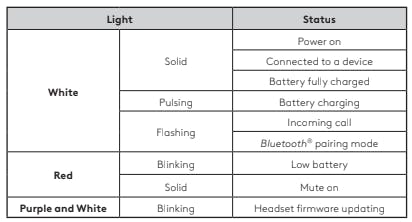
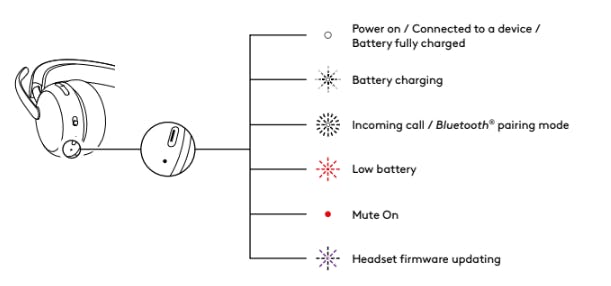
White
Solid - Power on / Connected to a device / Battery fully charged
Pulsing - Battery charging
Flashing - Incoming call / Bluetooth® pairing mode
Red
Blinking - Low battery
Solid - Mute on
Purple and White
Blinking - Headset firmware updating
Receiver Indicator Light - Teams Version, with receiver
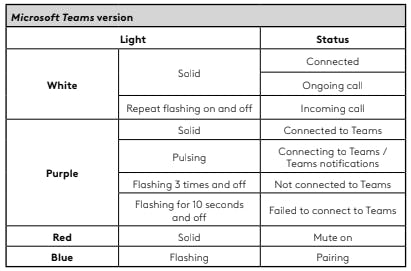
White
Solid - Connected / Ongoing call
Repeat flashing on and off - Incoming call
Purple
Solid - Connected to Teams
Pulsing - Connecting to Teams / Teams notifications
Flashing 3 times and off - Not connected to Teams
Flashing for 10 seconds and off - Failed to connect to Teams
Red
Solid - Mute on
Blue
Flashing - Pairing
Receiver Indicator Light - UC Version, with receiver
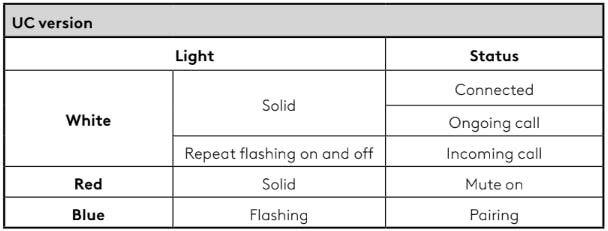
White
Solid - Connected / Ongoing call
Repeat flashing on and off - Incoming call
Red
Solid - Mute on
Blue
Flashing - Pairing