
Configuring audio for Digital Signage with RoomMate
In some RoomMate Digital Signage-only configurations, you may desire to use the built-in TV speakers to play the audio from the content being displayed. It’s important to note that RoomMate does not support audio on the HDMI Out. To achieve audio out for Digital Signage-only use cases, some additional connections and devices are needed to deliver audio from RoomMate to the TV speakers. Please see below information on how to extract audio from RoomMate's USB port and embed it into the HDMI connection to the TV.
To achieve audio out from RoomMate to your TV Speakers, Logitech currently supports the following configurations:
RoomMate for Digital Signage-only + audio: USB to HDMI adapter
Logitech has tested the following hardware for use in a HDMI-only configuration:
This configuration provides audio over to the display over the HDMI connection from the StarTech USB32HD4K.
Note: this configuration is currently affected by a Known Issue that affects Zoom Rooms Digital Signage in some scenarios. Please review the known issue before choosing this configuration.
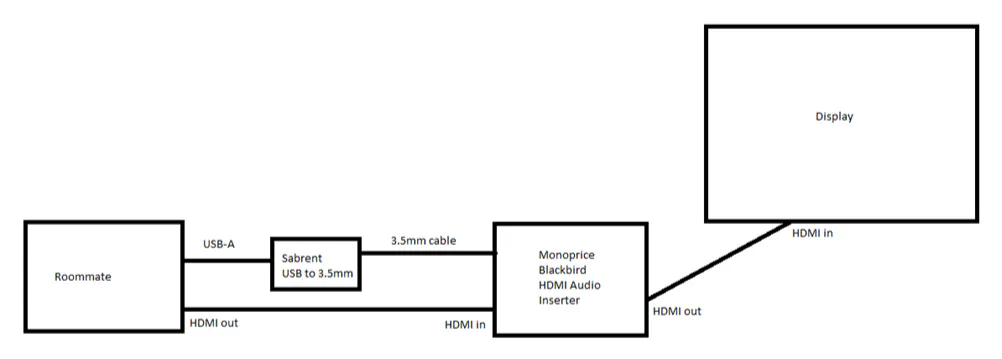
RoomMate for Digital Signage-only + audio: USB to 3.5mm adapter
Logitech has tested the following hardware for use in the USB to 3.5mm adapter configuration:
Monoprice Blackbird Audio Inserter
Sabrent USB External Stereo Sound Adapter
Amazon Basics 3.5mm male to male audio cable
Additional HDMI cable
This configuration provides a discrete audio output from RoomMate over USB, which can then be recombined with the HDMI output from the RoomMate's built-in HDMI port, to be sent onward to the display as follows:
You can find a full list of whitelisted audio devices for RoomMate here.